
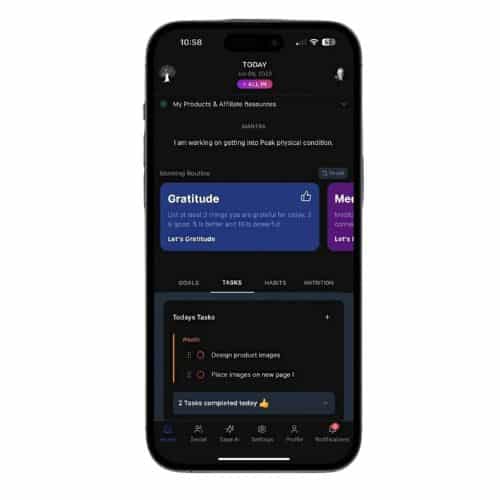
Oh my gosh, SO MUCH!
Goal Cards
You have these cool goal cards where you can set goals with a finish timeline and also add micro-steps to keep you on track towards your goals.
Digital Vision Board
There’s also a digital vision board where you can store images of the things you’re working on creating in your life and future to help keep you motivated. You can include these images as a part of your morning routine to make sure the future you are creating is top of mind.
Digital Journal
There is a digital journal that allows you to keep track of your memories and thoughts on-the-go. Cool thing about keeping a journal digitally is now your memories are searchable. Additionally, you can use voice dictation to keep your journal, which makes keeping a journal much easier. You can also upload pictures and images to your journal entry.
When you view your journal archive, every journal entry that has an image with it will have a little photo icon next to it, making it easy to scan your journal for the ones that have pictures of important memories.
Oh, you can also export your journal entries via PDF or CSV. PDF makes it so you can grab your digital journal in a way that’s easy to read and review. We included CSV export in case you ever want to train an AI on your writing.
Our digital journal also has auto-save, so you don’t lose your work. It’s accessible anywhere with an internet connection. There’s also a cool AI button that will auto-check your spelling, grammar, and punctuation.
Task Management
You also get task management with your Let’s Goal app. So it’s like a to-do list, but you can sort your tasks by category. Also, you can click these little radio buttons when you check off the task, and it gives you this cool audio feedback, which is like an extra hit of dopamine to your brain. You can also hide default categories and set your own categories.
Habit Tracker
Next is the habit tracker. This is great for creating new disciplines and gives you a way to set up habits and check them off every day as you complete them. Every time you check off a habit, you get a very cool confetti celebration saying “Congratulations” with your name. This, along with seeing and keeping track of your streaks, is very motivational and behavior reinforcing.
There’s a weekly view so you can see at a glance where you’re at with the week, and there’s also a calendar view. The habit tracker keeps track of not just streaks, but also the total number of completions. This way, if you happen to break a streak, you can see your total completions and still not feel like a total loser. 🙂
Nutrition Tracker
Next, you get a nutrition tracker. This is the opposite of complicated. It allows you to enter your:
- Calories
- Protein
- Carbs
- Water consumed (if you want)
Throughout the day, and it will keep a running total for you. So, you know exactly where you’re at. You just click “reset” at the end of the day, and it sets your calculator back to zero. No barcodes or extreme micro-level macro tracking. Just the big ones.
Note-Taking
Next you have a note-taking feature with Let’s Goal. You have a little note that stays up on your dashboard that you can keep daily notes. This little note will stay on your dashboard until you delete or archive it. If you archive the note, it goes into your notes archive. This is where you can store notes and search them to find important things when you need them.
Morning Routine
Of course there’s the morning routine feature with Let’s Goal that’s pretty cool. It has a list of activities that are really good to do in the morning to help get your mind and your life pointed in the right direction. Let me give you a list of all the things you can include in your morning routine:
- Gratitude
- Stretch
- Prayer or Meditation
- Visualization
- Purpose and Affirmations
- Exercise
- Reading
- Journaling
- Today’s Mantra
- Plan Your Day
In the Settings area of Let’s Goal, you can uncheck any of these to exclude them from your routine. You can also drag and drop or reorder them if you’d prefer to do them in a different sequence.
Push Notifications
Since we’re talking about the settings, we may as well mention another setting that you can customize for your Let’s Goal app. If you save your time zone, and enable push notifications, you can schedule a reminder to come to you right on your phone when it’s time to do your morning routine. If you click this push notification, it will take you right into your first morning routine step.
Gratitude Journal
I mentioned gratitude above in the morning routine description. Well, Let’s Goal also includes a gratitude journal. So if you include this in your morning routine, you’ll be storing a journal of all of the things you are grateful for throughout your life. This is accessible via the morning routine, or also just going directly to the gratitude journal. And yes, the gratitude journal is also searchable and exportable, and you can put images in your entries here too.
Quotes Journal
Next is the “Quotes” journal. This is a way for you to save your favorite quotes with author names. You can search them to find the quote you need when you want it. And there’s also a quote viewer where you can open up a beautiful display of the quote that has stunning photos behind them with scrollable action, so you can navigate through each quote in a beautiful way and review what you’ve been learning. This is a great way to take and review notes as you are reading.
You can also set these quotes to display when you log into Let’s Goal every day for the first time. You can set it up to display only your quotes and rotate through them each day, or you can use the system quotes, or you can do a combination.
Affirmations
The affirmations area is totally customizable, however it does come pre-loaded with the Major Definite Purpose and Self-Confidence Formula from Napoleon Hill.
Calendar
There is also a calendar feature in Let’s Goal where you can connect it to your Google Calendar and manage your schedule right from your Let’s Goal dashboard.
Planning Coach
In the morning routine description above, I mentioned “plan your day.” This is as easy as adding items to your to-do list when you’re in the planning step. But there’s also a planning coach. This planning coach will walk you through a handful of questions that are designed to help you create the most effective day.
Pricing and Referral Program
It’s amazing you get all of this for only $10/month, and it includes an 80% residual referral program.
Family Sharing
But we’re not done. In the settings area, you have the ability to invite up to 7 immediate family members to use Let’s Goal for free with your $10 membership. They will get their own login and be able to have their own personal growth journey and not have to pay a dime.
If you’re inviting a spouse, you’ll want to make sure and check the spouse button because the spouse account is slightly different than the family account. The spouse account gets the ability to set up their own social media profile for The Home Business Academy social media network. Family accounts outside of the spouse account do not have access to the social media network.
Additional Settings
You can also turn sounds for the app on or off in the settings area.
You have the ability to view Let’s Goal in dark mode or light mode, also in the settings area.
In the landing preference setting, you can set Let’s Goal to open up to the social media feed or to your Let’s Goal dashboard when you log in.
Let’s Goal members also have access to the privacy demo mode setting. This automatically blurs out sensitive information in your dashboard, in case you ever want to show people the app. Mainly helpful if you’re an affiliate and promoting this to build an income stream.
Messaging
Oh, I almost forgot. You also have a messaging feature with Let’s Goal where you can message the person who referred you and/or message the people you have referred to stay in touch.
Customer Support
All Let’s Goal members also have access to our Sage customer support assistant. Sage is great for answering questions and also helping you find what you need.
All right, I think that about covers it. You get everything above for $10/month, and if you share it with others, you can grow residual income with $8 residuals for every referral.
You can learn more by watching this video here, And if you want to see a more thorough demonstration of the product, this is the perfect video to watch.
Thanks for reading. Whatever you do, always go for your dreams!

